
Stamping Error Messages
ES10 : There are some Android devices with 3-fingers screenshot function, please go to Setting and disable 3-fingers Screenshot to allow stamping.
There are devices from certain mobile brand’s has built-in features that can interrupt multi-touch, causing issues in recognizing stamp patterns on the client side. Brands like OPPO/VIVO/OnePlus/HTC are a few common ones. Since we had difficulty in comprehensively identifying all the devices creating this issue, we added a mechanism in our SDK by displaying this notification when our Auth. system captures only 3 points consecutively, instead of 5 points.
Therefore, this means that the users with this message will need to go to their settings to disable this function to allow stamping, or will need to use OTP instead of stamping.
For Step-by-Step instructions on how to access the device settings and disable the function in the screenshots below:
● Oppo Device

● OnePlus Device
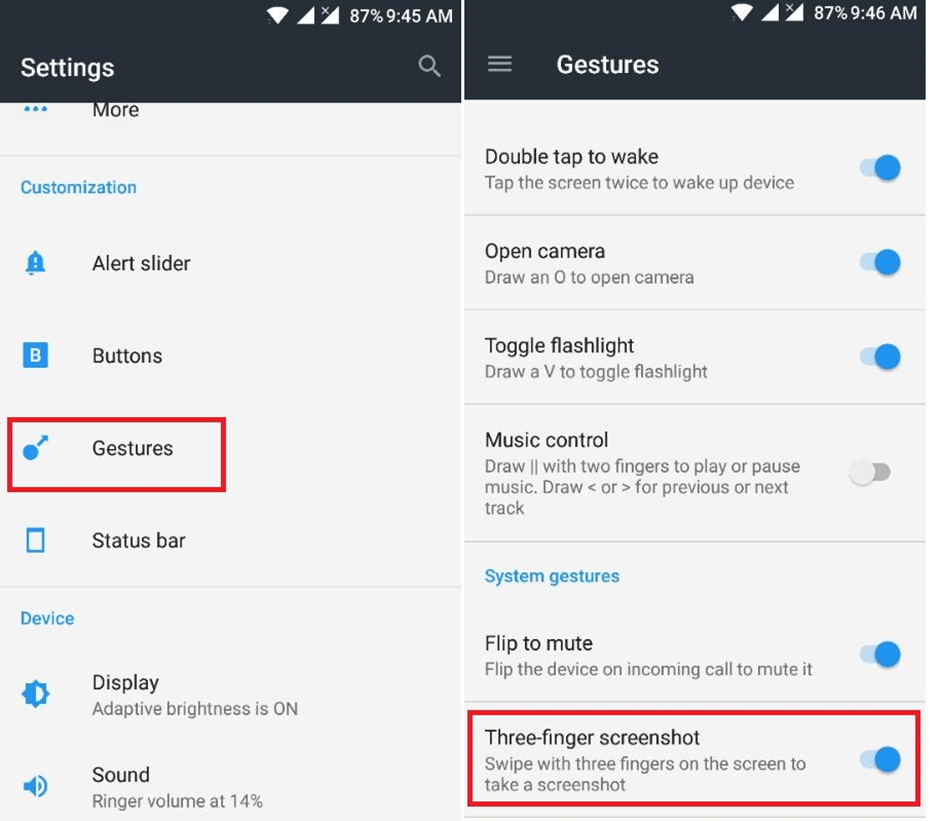
● HTC Device
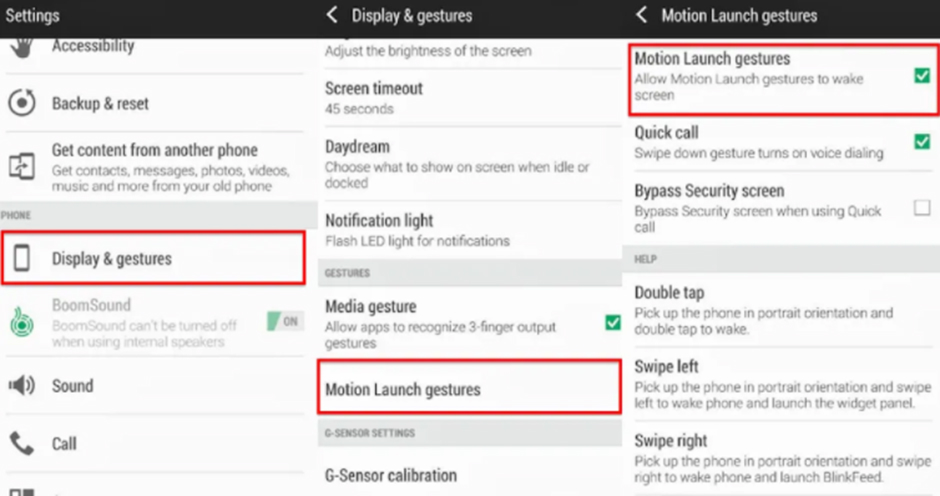
● Xiaomi Poco Device
Go to ‘Setting’ -> ‘Additional Setting’ -> ‘Gesture shortcuts’ -> ‘Take a screenshot’ -> Disable ‘Slide 3 fingers down’

Also refer:
https://www.koalasampler.com/help/android/i-cant-use-more-than-2-fingers-on-my-poco-xiaomi-phone/
ES05 : ES05 SDK is failed to be initialized successfully. The SDk is unusable.
As indicated in the message, this error occurs when a user attempts to use the stamping feature on the service page before the SDK has been properly initialized.
Our assumption is that, due to the server used for your UAT service, there may be latency issues in initializing the SDK, and the user stamps on the phone before the SDK is fully initialized.
If you encounter this issue again, we kindly recommend allowing a brief moment for the SDK initialization process to complete, and try stamping again.
If you still encounter the same issue after doing so, please kindly provide us with the date and time when the error occurred, so we can check the log on our end to investigate the issue.
ES06 : Please gently stamp on the screen for 1 second for correct approval.
The stamping might also not be working properly when:
- a thick screen protector is placed on the screen
- the user does not stamp vertically but at an inclined angle, etc
- the user has a specific device that the stamp is not supported
- all the five touch-points are not captured correctly because the user does not stamp it within the screen
 ChapterVI | First Meta Stamp-ing loyalty platform in Singapore